-

Three agents move your data.
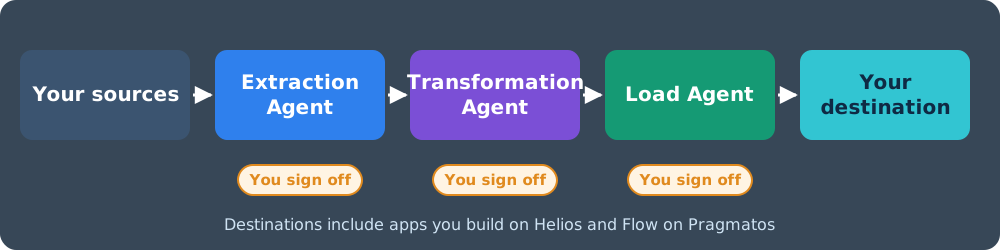
You sign off.Migrate with Albatross: an Extraction Agent, a Transformation Agent and a Load Agent carry your data from the old system into the new one.
-

Wearing the right hat
for migration?Explore Albatross Data Migrator to see if you are.
De-Risk your migration with the proven ETL platform. -
DATA VARIATIONS NOT FITTING
THE SYSTEMS?Albatross Data Transformer can help ease it
Albatross architecture as agents
Three agents do the legwork of your migration. Your people make the calls.
Migrate with Albatross and the work splits three ways. The Extraction Agent reads your old systems, the Transformation Agent reshapes what it finds to fit the new one, and the Load Agent puts it there. Between each of them sits a sign-off from the people who own the data.

Extraction Agent
Talks to the sources you already have.
Connects through adapters, profiles volumes, formats, older versions, missing files and references, then runs the pre-migration checks and ranks the issues.
- XML, JSON, CSV, DMP, TXT
- Flat files
- File servers
- System folders
- Databases
- Big-data stores
- Enterprise systems
- Social feeds
You decide: which sources go, and whether the validation report is clean enough to move on.
Transformation Agent
Reshapes your source data to fit the destination.
Proposes how each source attribute maps to the destination, applies the rules you choose, flags what it cannot map with confidence and re-validates the result.
- Value changes
- Merge and split
- Enrich
- Include or exclude
- Filters
- Custom program
You decide: every map and rule before it runs, and every flag it raises.
Load Agent
Loads into the destination you chose.
Stages objects, relationships and file entries with matched file paths, runs loads in parallel, logs each one and restarts from the last good point after an error.
- Enterprise systems
- RDBMS and big data
- Cloud systems
- Apps you build on Helios, run on Flow on Pragmatos
You decide: the test-load results, and the go-ahead for production.
Data Migration is challenging and exasperating. It is not uncommon for migration projects to throw plans out of gear. However it is inevitable for constantly changing organizations to migrate data irrespective of its complexities, risks and costs involved. Companies aspire a business-as-usual pain-free data migration strategy and execution.
Migration – Top Drivers
Typical needs for migration in Organizations
Need for Migrations could result from various causes in an organization, It can be due to application modernization, mergers and acquisition, implementing a new software or integration of two systems, migration to cloud or regulatory mandates. No matter what the reason is an effective strategy and proven platform becomes imperative in the whole journey.

Data Migration – Typical Challenges & Pitfalls
Failure to follow Migration Best Practices & Use Standard Tools
Skipping Data Discovery & Due Diligence
- Incomplete Data profiling of the source and target systems
Improper Audit, Validation & Data Quality Check
- Missing Volume reconciliation, Pre & Post Extraction / Transformation & Load sampling
Underestimating Connectivity & Data Adapters
- Lack of adequate Source and Target System adapters API compilations for extraction/loading

Inadequate Tools
- Missing error / recover modules, file & data transforming handlers, flexible mappers, loggers and more
Lack of Cutover & Legacy Retirement Strategies
- Missing legacy Retirement / Integration and system cutover planning.
Lack of Collaboration
- Between Data Stewards, developers, business users, quality engineers


Albatross Brochure Download
Albatross GIDX Payload Structure

General Integration Data eXchange (GIDX)
General Integration Data eXchange (GIDX) is the platform’s neutral payload format that can transfer custom data over-the-wire for an effective data exchange between systems. The payload backbone handles custom data types, attributes, relations, relation attributes, files and formats, transformations and character encoding definitions.
ALBATROSS ARCHITECTURE
This is the engine the three agents drive: extraction adapters on the left, the validation and transformation engine in the middle, the loader on the right, with the GIDX payload underneath.

Albatross Migrator Modules
Seven modules, each with an agent at its side. The agent does the repetitive part and shows you what it did; the module keeps every setting in your hands.
-

Data Extractor
- Adapter Connections
- System Folders
- File Servers
- Databases
- Social Feed
- File Formats
- Volume and Extraction Logs
-

Pre-Migrate Validator
- Validation Algorithms
- Post to Falcon Analytics Server
- Load Analytics Report
- File Missing
- Missing Reference
- Older Version
- Data Type Mismatch
- Format Check
- Special Character
- Duplicates
- Missing Attributes
-

xCAD Transformer
- Validation Choices
- Apply Transformation
- Generate Transformed Data
- Transformation Logs
-
Post-Transform Validator
- Validation Algorithms
- Post to Falcon Analytics Server
- Load Analytics Report
- Re-referencing
- Correlated Reference
- Latest Version
- Data Type Mapped
- Format Check
- Special Characters
- Duplicates Removed
- Missing Attributes
-

Meta-Data Transformer
- Data Mapper Configuration
- Transformation Rules Sync
- Destination Format/Size Validation
- Plain/Value
- Inclusion/Exclusion
- Merge/Split
- Enrich
- Custom Program
- Filters
-

Loader Configurator
- Stage Load Settings
- Error – Restart Config
- Parallel loading Config
- Loading Log Settings
- Destination Adapter Connection Settings
-

Loader
- Stage & Run Load
- Parallel Execution
- Loader Logs
- Error & Restart Load
-
Your Sign-off
- Approve the validation report
- Approve maps and rules
- Accept the test load
- Release the production load
Albatross Platform Gallery
Data Migration in Action
Albatross follows an ETL migration mechanism with configurability at every step. All steps are discrete and can be performed re-starting at a point where it was left off previously. Logs and notifications are generated at each module for validation and resumption.

Inside steps 5 and 6
One run through the Albatross Migrator
Each test round in the 7 steps of migration, and the production run after it, goes through these screens. An agent works each screen; your team clears it before the next.
Choose source
Extraction Agent
Connects to your source and destination and lists what it found.You: confirm the scopePre-migration validation
Extraction Agent
Runs the validation set and ranks issues: missing files, references, duplicates, format errors.You: accept the reportTransformation
Transformation Agent
Proposes attribute maps and applies the rules you picked.You: approve the mapsValidate transformation
Transformation Agent
Compares the result with the pre-migration picture and points to every difference.You: clear the flagsStaging
Load Agent
Generates the stage files for objects, relationships and file entries.You: check the stageLoader settings
Load Agent
Proposes add, modify, delete or replace modes, parallel runs and restart points.You: confirm the settingsImport
Load Agent
Loads, logs and reconciles; after an error it resumes from the last good point.You: sign off the load
The screens below show this run in the Albatross Migrator.
-
 Extractor
-
 Pre - Validation
-
 Analytics
-
 xCAD Transformation
-
Post - Validation
-
 Meta-Data Transformation
-
 Stager
-
 Loader Configurator

01Loading Source & Extractor Connections
- Choose Source System.
- Choose Destination System.
- Point to Workspace Directory
- Indicate Transformation Directory.
- Data Mapping Source Attributes.

02Pre - Migration Validation
- Validation Set Choice.
- Execute Validator.
- Generate Analytics
- Post it to Crius Falcon Analytics Server.
- Launch Pre-Migration Validation Analysis.

03Albatross Validation Analytics
Configurable Dashboard to display data aggregates prior to and post transformation

04Transformation (xCAD only)
- File Open issues.
- Missing References.
- Data Type Mismatch and Format changes.
- Duplicates & Missing Attributes.
- Special character changes.

05Post - Migration Validation (Compare Results with Pre-Validation)
- Validation Set Choice.
- Execute Validator.
- Generate Analytics.
- Post it to Crius Falcon Analytics Server.
- Launch Pre-Migration Validation Analysis.

06Meta-Data Transformation
Data Transformation Mapper for Custom Attribute Settings on variations between Source and Destination Systems
Transformation Options -
- Attribute transformations can be simple value changes to split and merge. Complicated transformations can be achieved with Custom Program Plug-In with fuzzy mapper logic.
Transformation Mapper -
- Configurable mapper for various combinations of meta-data transfer provides clutter transformations in data and formats.

07Loading Stage File Generator
- CSV based objects, relationships and file entries.
- Physical file paths correlated for check-in.

08Loader Configurator
- Add / Mod / Delete / Replace modes.
- Log and Notification settings.
- Error and Resume settings.
- Loader parallelization.
- Command Line syntax for App extension.
How do we plan and execute your migration?
The 7 steps of migration
Four phases, seven steps of migration. Step 6 is a test loop you repeat until the results match, then run once more on production. In each phase the agents prepare, check and report; your team signs off before the next phase starts.

Albatross and Pragmatos
Move off the old system, land on one you can grow
Your process may run on Excel, paper, someone's head, or a legacy system that does not fit the modern digital highway. Migrate with Albatross, build what replaces it on Helios, and integrate it with the rest of your plant through Mateos, all on Pragmatos.
1. Migrate with Albatross
The three agents carry your records, files and their relationships out of the old system, with a sign-off at every gate.
See the agents2. Build it on Helios
The apps you build on Helios, and Flow on Pragmatos, are destinations the Load Agent can load into.
Build with Helios3. Integrate with Mateos
After cut-over, Mateos keeps the new system in step with your ERP, MES and quality systems, so the data you moved stays current.
Integrate with MateosPragmatos runs on prem, in your own cloud, or both. See Pragmatos
Illustrative Case Studies

Mining and Cement
- Complex Migration of 4 systems to ENOVIA PLM
- CAD and Meta-Data defining core product structures
- Transformation, Validation Metrics and Reports

Migration/Integration
- CATIA , ENOVIA, WINDCHILL triangular migration & integration
- EPDM ERP Migration


Migration/Integration
- ENOVIA & Teamcenter
- Migration & Integration
- Visualization & Dashboards


Migration/Integration
- 72+ systems & processes
- Transformation ongoing for entire organization
- Planned 9+ year engagement
