

Whose Clock Is Right? Timestamps, Time Sync and the Machine Data Nobody Lines Up
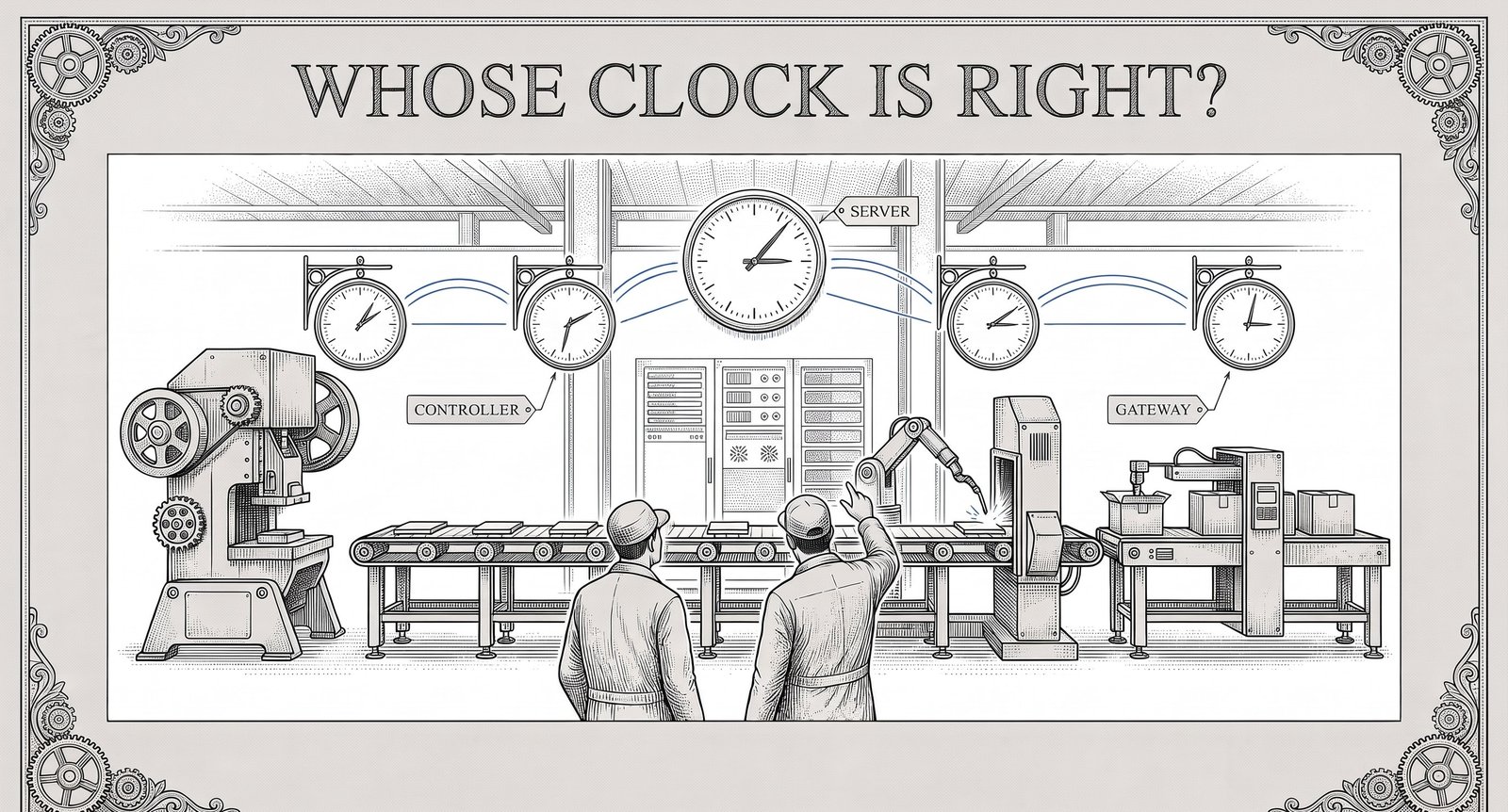
Here is the short version. Every record a machine produces starts with a time. In a plant with machines of different brands and ages, those times come from several clocks: in the controllers, in gateways, in servers and in whichever computer asked for the value. Rarely does anyone compare those clocks. OEE, root cause, traceability, energy per part and every model trained on the data assume they agree.
They often do not. A value can be exactly right and still sit at the wrong moment. This article is about that second kind of error: where it comes from, what it breaks, and the checks a plant can make before trusting a timeline it has never tested.
Listen — audio overview
Industrial Reality Check
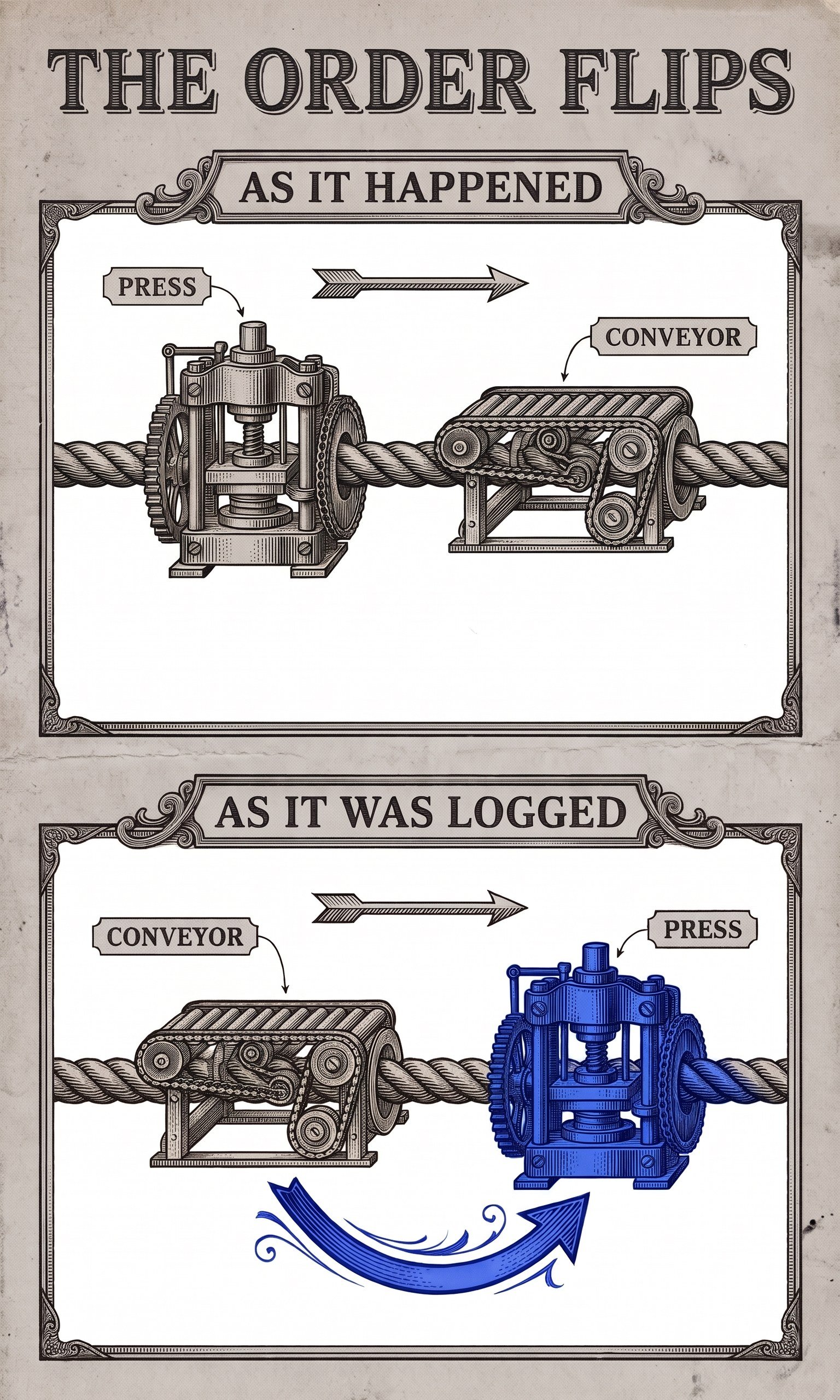
A line stops at 02:14 on a Tuesday. The morning review opens the event log. The conveyor stopped first, at 02:14:03. The press reported a jam at 02:14:31. The conclusion writes itself: the conveyor stopped, the press ran on and jammed. Maintenance is sent to the conveyor.
The conveyor is fine. Three weeks later the same stop happens again, and this time an operator was standing next to the press. The press jammed first. The conveyor stopped because the press told it to.
What happened in between is not in any report. The press controller has its own clock. Nobody has set it since it was commissioned, and nothing synchronises it. By now it runs about half a minute ahead of the server that stamps the conveyor's events. Every event the press reports is stamped about half a minute late, and only in the cases where two machines interact does that become visible, as a cause that appears after its effect.
Nobody made a mistake. Each clock did exactly what it was built to do. The plant never asked which clock wrote which line.
Why the Problem Exists Structurally
In an office network, time is solved. Servers and laptops ask a time server several times a day, and nobody thinks about it. That habit leads plant IT teams to a reasonable assumption: the plant has a time server, so the plant has the right time.
The shop floor is built differently. A brownfield plant contains controllers from several decades and several makers, each with its own real-time clock, set by hand at commissioning or never set at all. Many were never connected to a network that carried time. Some have no setting for a time server. Some do, but it was not configured because the machine ran fine without it.
On top of that, the machine data passes through layers before anyone sees it: a controller, perhaps a gateway, a collector, a historian, a database, a report. Each layer can add a time of its own. Some layers keep the time they were given. Some replace it with the moment the data arrived. Some keep both and hand on only one.
So the question "what time did this happen?" has several possible answers for every event, and the answer that reaches the report depends on choices made by whoever configured each layer, often years apart and never written down.
Why Now
Time has been a quiet problem for decades. Four things make it a louder one now.
The clocks moved, and they will keep moving. The clocks went back on the last Sunday of October. The European Union proposed ending seasonal clock changes in 2018. The proposal has been stuck in the Council since 2019 without a timetable, so every plant on a seasonal clock will run a 23-hour day next spring and a 25-hour day next autumn, again.
Leap seconds are ending. In October 2026 the General Conference on Weights and Measures, the treaty body for the SI, adopted a resolution that makes UTC continuous from 20 May 2027 and allows the difference between atomic time and the Earth's rotation to grow to as much as an hour. No leap second has been added since the end of 2016, and now none will be. For most plants this removes a rare edge case. For anyone whose systems mix UTC with GPS time, which already runs 18 seconds ahead of UTC and does not apply leap seconds, it is a reminder that "the time" is a set of conventions, not a fact.
Satellite time is being jammed. A European Union Council note of May 2025 records 1,150 aircraft affected by satellite navigation jamming or spoofing in Estonian airspace in October 2024 and 1,085 in January 2025, with higher figures for its neighbours, and points out that the same satellite signals are used to synchronise telecom networks. Satellite receivers are also a common time source in industrial networks, so jamming affects time as well as navigation.
Regulators now ask for clocks that agree. The implementing regulation for NIS2, Commission Implementing Regulation (EU) 2024/2690, requires the digital-service providers it covers to ensure, to the extent feasible, that all systems have synchronised time sources so that logs from different systems can be correlated. Manufacturers fall under national NIS2 law rather than this regulation, but the EU cybersecurity agency's non-binding guidance on it (June 2025), which names NTP or PTP, is widely read as the reference for what "synchronised" means. IEC 62443-3-3, the industrial security standard many plants already work to, has its own timestamp requirement. In regulated industries, audit trails have long had to be time-stamped. None of these rules sets a tolerance in milliseconds. All of them assume that two logs can be laid side by side.
And one date further out is already in vendor advisories. Devices that count time as a signed 32-bit number of seconds since 1970 run out at 03:14:07 UTC on 19 January 2038. A controller maker's 2025 security advisory, updated in August 2026, describes controllers on which some functions stop working when their date is set to that day. 2038 is closer than the expected service life of much of the equipment installed this year.
What a Timestamp Actually Is
A timestamp is not one thing. It is an answer to a question, and different systems answer different questions.
When was it measured? This is the time the sensor or controller took the value. It is the one analysis needs.
When was it sent? The time the value left the device or gateway.
When did it arrive? The time a server, collector or database received it.
When was it written? The time it was stored. After an outage, this can be hours after it was measured.
The common industrial protocols answer these questions in different ways, and some do not answer them at all.
OPC UA can carry two timestamps on every value. The specification defines a source timestamp, applied by the data source, and a server timestamp, the time the server received the value or knew it to be accurate. Each server in a chain applies its own server timestamp. When the source timestamp is missing, many clients fall back to the server timestamp, and the record looks equally precise.
Sparkplug B, the industrial convention for MQTT, also separates them. Every message carries the time it was sent, and every metric can carry the time it was acquired. It also defines a flag for historical data, which the reference payload definition describes as data that "should not update real time tag".
Plain MQTT has no timestamp of its own. The time travels inside the payload, in a user property, or not at all.
Modbus has no time field in the protocol. The polling side stamps each reading when the reply comes back, so the time includes the polling interval and the network delay. A device-side time exists only if the maker put it in registers.
MTConnect agents put a UTC time on each observation they hold. It usually comes from the adapter that feeds the agent, which may or may not be the controller's own clock.
So two values in the same database, recorded "at the same second", may have been measured, sent and received at quite different moments, by clocks that were never compared. A database column called `timestamp` does not say which of the four questions it answers. We compared the protocols themselves in MQTT vs OPC UA vs Modbus in 2026. Time is one of the places where the differences matter most.
An Illustrative Calculation
The numbers below are round and illustrative. They show the mechanism, not typical values for any plant.
Drift. A controller's real-time clock runs on a quartz crystal. A crystal with a tolerance of 20 parts per million can gain or lose about 1.7 seconds a day at room temperature. Temperature and ageing add to that. Over 30 days without correction, that is roughly 52 seconds.
Now take two machines on the same line. One is stamped by a server that is synchronised. The other stamps its own events with an uncorrected clock that has drifted 52 seconds ahead. Any two events between these machines that happened less than 52 seconds apart can now appear in the wrong order. On a line where a stop on one machine causes a stop on the next within seconds, that covers almost every case in which the drifting machine stops first, which is exactly the case in which it is the cause.
Polling. A power meter on Modbus is polled every 10 seconds. A vibration sensor on the same machine reports with a source timestamp. A spike in current and a spike in vibration that happened at the same instant can appear up to 10 seconds apart. If a model is trained on enough of those, it learns that the vibration spike comes first and the current follows up to 10 seconds later, a lead time that exists only in the polling schedule. A spike shorter than the polling interval may never be recorded at all.
The 25-hour night. On the night the clocks go back, a night shift planned from 22:00 to 06:00 runs 9 hours, not 8. A machine making 60 parts an hour makes 540 parts. Measured against a planned 8 hours, its performance rate comes out at 112.5 percent, which is impossible. In spring the same shift runs 7 hours, makes 420 parts and shows a 12.5 percent loss that never happened. If local time is stored without its offset, the repeated hour in autumn can also land twice in the same hourly bucket, so the energy for that hour is counted against the wrong parts.
None of these is large on a monthly report. Each one is enough to send maintenance to the wrong machine, to teach a model a false pattern, or to make one plant look better than another on a night nobody chose.
The Named Failure Modes
These are the patterns to look for. Name them in your own plant and they become easier to spot.
The 1970 alarm. A controller is powered off for a long shutdown. Its clock backup, often a small capacitor or battery, runs out, and the clock wakes up at a default date. Its alarms sort before every other record in the historian, and the downtime report opens with an event decades old.
The drifting witness. A device clock that nobody synchronises drifts by seconds a day. After a few weeks, the effect is logged before its cause, and root cause analysis blames the machine that was in fact the victim.
The midnight replay. The network drops for six hours and a gateway holds the data back until it can send again. On reconnect, the backlog arrives. If the receiving system does not recognise it as history, last night's values overwrite live ones, and the dashboard shows a storm of short stops that never happened.
The 25-hour night. Times are stored in local time without an offset. On the autumn night the clocks go back, one hour appears twice; in spring, one hour never exists. OEE and energy per part for those nights are wrong in both directions.
The arrival stamp. A value is stamped when it reached the server, not when it was measured. Every reading carries the delay of its path, and readings from different paths can no longer be lined up.
The two-clock join. A quality result from the lab system and a process value from the line are joined by time. The lab system uses one clock, the line another. The join attaches the measurement to the wrong part, or to no part at all, and traceability is broken at exactly the point an auditor will ask about.
Why This Is an Architecture Problem Before It Is a Data Problem
The usual response to bad data is cleaning: find the outliers, fix the gaps, correct by hand. That does not work for time. Once a value has been stored at the wrong time, the error looks like any other value. Nothing in the record says the clock was 52 seconds off.
Time has to be right where the data is created, and it has to stay attached as the data moves. That is a design decision at each layer:
- Where time comes from. Which devices can take time from a network source, which ones cannot, and how the ones that cannot are stamped instead.
- Which time is kept. At every hop, whether the original time from the source travels on, or is replaced by the time of arrival.
- How time is stored. UTC in storage, local time only on the screen, and the time zone kept with the site so the 23- and 25-hour days are handled by arithmetic, not by luck. The relevant internet standards, RFC 3339 and the 2024 extension RFC 9557, give a format that keeps the offset and the zone name together.
- How late data is marked. When a gateway sends data it held back during an outage, the data says so, and the receiver writes it into history rather than over the present.
- How good each clock is. For each source, a known and written accuracy, and a check that it still holds.
Almost all of this is decided once, early, and fixing it later means re-deriving every stored time. A historian with five years of mixed local and UTC times, with nothing recording which is which, cannot be corrected by a script. This is the same point we made in Why AI Without Context Fails in Manufacturing: a value without its context, here the time and the clock behind it, is not ready for analysis, however much there is of it.
Choosing the Clock You Trust
There is no single right answer for how accurate a plant's time must be. The right answer depends on the question being asked.
Seconds are enough for shift reports, daily OEE and most energy figures. Here the most important thing is that every system uses the same seconds and that local time is handled correctly.
Tens of milliseconds matter when events on different machines must be put in order: a stop that cascades along a line, an alarm sequence, a security incident traced across systems. NTP over a well-run local network can usually achieve this, often better. The weak point is usually the device, not the protocol: many controllers ask for time rarely and drift in between. The time service built into a common server operating system, for example, is supported by its maker at 1 second, 50 milliseconds or 1 millisecond only on versions released from 2016 onward, only with every node in the time chain configured as documented, and only within stated network delays (under 5 milliseconds to the source for 50 milliseconds, under 0.1 milliseconds for 1 millisecond). Older versions are not supported for high accuracy at all.
Microseconds matter for motion control, fast power-quality analysis and some test benches. This is the domain of the Precision Time Protocol, IEEE 1588, and of time-sensitive networking. PTP reaches sub-microsecond accuracy with hardware timestamping and switches that take part in the protocol. One ordinary switch in the path adds its own queueing delay, which can cost tens to hundreds of microseconds, and more under load.
Most plants do not need the third tier everywhere. Most need the first tier to be true across all systems and the second tier on the lines where order matters. The common mistake is not choosing too little accuracy. It is never deciding, so each system has whatever accuracy it happened to get.
And every chain of time ends in a source. If that source is a satellite receiver on the roof, it is worth knowing what the network does when the receiver loses its signal or is fed a false one. A grandmaster with an oven-controlled or atomic oscillator holds time for hours after losing its signal; one with a plain crystal starts drifting within minutes.
Governance: Who Owns the Time
Time sits between IT and OT, which is exactly why it often belongs to nobody.
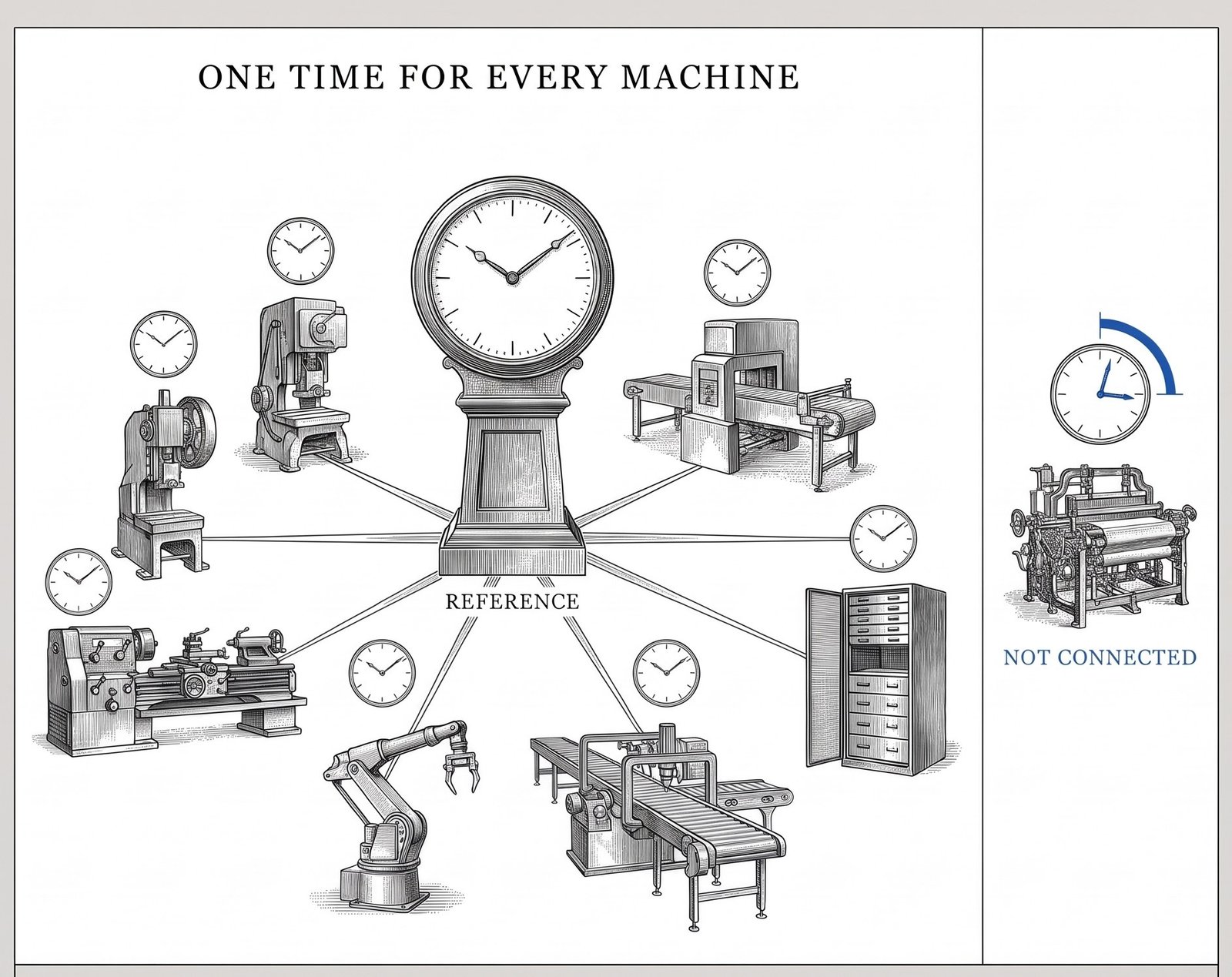
IT usually owns the time servers and synchronises the servers and laptops it manages. OT owns the controllers, and on the shop floor the rule is not to touch a running machine. Setting the clock on a controller can need a maintenance window, a password nobody has, or a call to the machine builder. So the controllers drift, and both sides assume the other one has it covered.
Three practical rules help.
Write the time design down on one page: where time comes from, which accuracy each area needs, which systems keep source time, and that storage is UTC. Put an owner and a date on it.
Check it, do not assume it. Once a quarter, compare each controller's clock with the reference and record the difference. A spreadsheet is enough. The first time this is done, the spread of differences can be the most useful number in the plant's data quality work.
Add clocks to the startup checklist after any long shutdown, battery change or controller replacement. Reset clocks found that way are found months before they would have shown up as a strange line in a report.
Decision Framework: Three Questions Before You Trust a Timeline
1. Whose clock wrote it? For the timeline in front of you, find out for each source whether the time came from the device, a gateway, a poller or the server. If nobody knows, the order of events is a hypothesis, not a finding.
2. How far apart are the clocks today? Compare the clocks involved with one reference and write the differences down. If two clocks are further apart than the gap between the events you are analysing, the order cannot be trusted.
3. What happened on the edges? Check whether the period includes a clock change, an outage after which data was replayed, or a restart after a long shutdown. These are where most timing errors enter, and they are easy to look for once you know to.
Executive Summary: Board-Level Interpretation
- Every machine record depends on a timestamp, and in a mixed fleet those timestamps come from several clocks that are rarely compared.
- The common industrial protocols handle time differently: some carry measurement time, some only arrival time, some none.
- Uncorrected device clocks drift by seconds a day. Daylight saving produces 23- and 25-hour days. Outages produce late data that can look like live data.
- These errors do not show on monthly reports, but they reverse cause and effect in root cause analysis, distort OEE and energy per part on specific nights, break traceability joins and teach models false patterns.
- They cannot be cleaned afterwards. Time has to be right where data is created and kept with it as it moves.
- Regulation already assumes synchronised clocks for security logs, and leap seconds, satellite jamming and the 2038 limit keep time on the agenda.
- The fix starts with a one-page time design, a quarterly clock check, and a clear owner between IT and OT.
Practical Implementation Checklist
- List the clocks. Every controller, gateway, collector, historian and server that writes a time into machine data.
- Record where each gets its time. Network source, satellite receiver, set by hand, or never set.
- Measure the gaps. Compare each clock with one reference and write down the difference and the date.
- Trace one value. Follow a single signal from the machine to the report and note at each hop which time it carries.
- Store UTC. Confirm that storage uses UTC, or local time with its offset, and that the site's time zone is recorded.
- Check last October. Look at OEE and energy per part for the night the clocks went back. Look for a 9-hour shift, a performance rate above 100 percent or a doubled hour.
- Test an outage. Disconnect one gateway for an hour in a planned window and check how the held-back data arrives and where it is written.
- Find the default dates. Search the historian for events dated decades in the past or years in the future.
- Write the time design. One page, with accuracy per area, the source of time, the owner and the date.
- Add clocks to restarts. After any long shutdown, battery change or replacement, the controller's clock is part of the startup check.
A note on where we stand
We make software in this space, so we are not a neutral party. Most of the checklist above needs a reference clock, a spreadsheet, someone from IT, someone from OT and a few patient hours, not a product.
We wrote it because, in our experience, when a plant's machine data does not add up, the cause is often a question nobody had asked: which clock wrote this?
If you would like to talk through the time design for your own plant, or what a first clock check found, we are glad to.
Questions worth asking in your next review
- For each machine signal we use, does the time come from the device, a gateway, a poller or the server?
- When did anyone last compare a controller's clock with the time on our servers, and how far apart were they?
- Do we store UTC, and what did last October's night shift look like in our OEE and energy figures?
- When the network to a gateway drops, does the data it held back arrive marked as history?
- Which of our devices would wake up at a default date after a long shutdown, and would anyone notice?
- Could we line up a machine alarm, a quality result and a security log for the same minute, and trust the order?
- Which devices in our plant store time in a way that runs out in 2038, and does anyone know?
The part that matters
Plants spend calibration budgets, sensor selection and data-cleaning hours on whether a value is right. Much less goes into whether it sits at the right moment, because a wrong time looks exactly like a right one.
Yet almost every question asked of machine data is a question about time: what happened first, how long it lasted, what was running when the part was made, what changed before the failure. If the clocks disagree, the answers are confident and wrong.
Time is the first field in every record. It deserves an owner, a design and a check, before anyone builds anything on top of it.
Sources
- The OPC UA specification, Part 4: Services, version 1.05, section 7.11 (source timestamp and server timestamp), published by the OPC UA standards organisation.
- The Sparkplug B payload definition in the open-source reference implementation of the Sparkplug specification: send-time timestamp, metric acquisition-time timestamp and the historical flag.
- The MQTT Version 5.0 standard (2019): the protocol defines no timestamp property.
- Resolution 5 of the 28th General Conference on Weights and Measures (October 2026): continuous UTC from 20 May 2027.
- Council of the European Union, note ST 9188/25 (May 2025), on satellite navigation interference in the Baltic region.
- Commission Implementing Regulation (EU) 2024/2690, Annex, point 3.2.6, and the EU cybersecurity agency's technical implementation guidance (June 2025).
- A semiconductor maker's application note on crystal accuracy in real-time clocks: 20 ppm corresponds to about one minute a month.
- A server operating system maker's published support boundary for high-accuracy time.
- A German industrial CERT's 2025 advisory, updated August 2026, on controllers on which some functions stop working when their date is set to 19 January 2038.
- Council of the European Union, policy page on seasonal clock changes.
- IETF RFC 3339 and RFC 9557 (2024), date and time formats with offset and time zone.
- IEC 62443-3-3, system requirement 2.11 (timestamps).
- The MTConnect standard, on observation timestamps supplied by the adapter or set by the agent.
- The International Earth Rotation and Reference Systems Service, Bulletin C: the offset between atomic time and UTC since 1 January 2017.
Pick one line and two machines on it. Compare their clocks with one reference today and write down the difference. If that difference is larger than the gap between the events you analysed in your last stoppage review, or nobody can say which clock stamps which signal, tell us in the comments below. We reply to every comment, and the full references behind this article are yours for the asking there too. To see first whether your machine data is ready for this kind of analysis, take the free self-assessment at criussoftware.com/res/kits/readiness/. It asks for a work email, your company name and your consent to be contacted, and returns a scored result.
Pick one line, one alarm last month and the quality result that followed it. Line up the controller's time, the gateway's time and the server's time for both. If they agree to the second, you have evidence. If they do not, you have found where every report built on that line begins to drift.
Read next
- MQTT vs OPC UA vs Modbus: A 2026 Architect’s Trade-Off Guide — which protocols carry a source time at all, and which leave it to whoever asks.
- Micro-Stops: The Losses That Never Reach a Report — short stops measured in seconds, the first numbers a drifting clock distorts.
- Why AI Without Context Fails in Manufacturing — time is the first piece of context a model needs, and the one most often assumed.
- Cybersecurity in the Age of Industry 4.0 — why correlated logs need one time across IT and OT before an incident, not after.
Full blog text — board-ready report format
Whose Clock Is Right? Timestamps, Time Sync and the Machine Data Nobody Lines Up
Here is the short version. Every record a machine produces starts with a time. In a plant with machines of different brands and ages, those times come from several clocks: in the controllers, in gateways, in servers and in whichever computer asked for the value. Rarely does anyone compare those clocks. OEE, root cause, traceability, energy per part and every model trained on the data assume they agree.
They often do not. A value can be exactly right and still sit at the wrong moment. This article is about that second kind of error: where it comes from, what it breaks, and the checks a plant can make before trusting a timeline it has never tested.
Industrial Reality Check
A line stops at 02:14 on a Tuesday. The morning review opens the event log. The conveyor stopped first, at 02:14:03. The press reported a jam at 02:14:31. The conclusion writes itself: the conveyor stopped, the press ran on and jammed. Maintenance is sent to the conveyor.
The conveyor is fine. Three weeks later the same stop happens again, and this time an operator was standing next to the press. The press jammed first. The conveyor stopped because the press told it to.
What happened in between is not in any report. The press controller has its own clock. Nobody has set it since it was commissioned, and nothing synchronises it. By now it runs about half a minute ahead of the server that stamps the conveyor's events. Every event the press reports is stamped about half a minute late, and only in the cases where two machines interact does that become visible, as a cause that appears after its effect.
Nobody made a mistake. Each clock did exactly what it was built to do. The plant never asked which clock wrote which line.
Why the Problem Exists Structurally
In an office network, time is solved. Servers and laptops ask a time server several times a day, and nobody thinks about it. That habit leads plant IT teams to a reasonable assumption: the plant has a time server, so the plant has the right time.
The shop floor is built differently. A brownfield plant contains controllers from several decades and several makers, each with its own real-time clock, set by hand at commissioning or never set at all. Many were never connected to a network that carried time. Some have no setting for a time server. Some do, but it was not configured because the machine ran fine without it.
On top of that, the machine data passes through layers before anyone sees it: a controller, perhaps a gateway, a collector, a historian, a database, a report. Each layer can add a time of its own. Some layers keep the time they were given. Some replace it with the moment the data arrived. Some keep both and hand on only one.
So the question "what time did this happen?" has several possible answers for every event, and the answer that reaches the report depends on choices made by whoever configured each layer, often years apart and never written down.
Why Now
Time has been a quiet problem for decades. Four things make it a louder one now.
The clocks moved, and they will keep moving. The clocks went back on the last Sunday of October. The European Union proposed ending seasonal clock changes in 2018. The proposal has been stuck in the Council since 2019 without a timetable, so every plant on a seasonal clock will run a 23-hour day next spring and a 25-hour day next autumn, again.
Leap seconds are ending. In October 2026 the General Conference on Weights and Measures, the treaty body for the SI, adopted a resolution that makes UTC continuous from 20 May 2027 and allows the difference between atomic time and the Earth's rotation to grow to as much as an hour. No leap second has been added since the end of 2016, and now none will be. For most plants this removes a rare edge case. For anyone whose systems mix UTC with GPS time, which already runs 18 seconds ahead of UTC and does not apply leap seconds, it is a reminder that "the time" is a set of conventions, not a fact.
Satellite time is being jammed. A European Union Council note of May 2025 records 1,150 aircraft affected by satellite navigation jamming or spoofing in Estonian airspace in October 2024 and 1,085 in January 2025, with higher figures for its neighbours, and points out that the same satellite signals are used to synchronise telecom networks. Satellite receivers are also a common time source in industrial networks, so jamming affects time as well as navigation.
Regulators now ask for clocks that agree. The implementing regulation for NIS2, Commission Implementing Regulation (EU) 2024/2690, requires the digital-service providers it covers to ensure, to the extent feasible, that all systems have synchronised time sources so that logs from different systems can be correlated. Manufacturers fall under national NIS2 law rather than this regulation, but the EU cybersecurity agency's non-binding guidance on it (June 2025), which names NTP or PTP, is widely read as the reference for what "synchronised" means. IEC 62443-3-3, the industrial security standard many plants already work to, has its own timestamp requirement. In regulated industries, audit trails have long had to be time-stamped. None of these rules sets a tolerance in milliseconds. All of them assume that two logs can be laid side by side.
And one date further out is already in vendor advisories. Devices that count time as a signed 32-bit number of seconds since 1970 run out at 03:14:07 UTC on 19 January 2038. A controller maker's 2025 security advisory, updated in August 2026, describes controllers on which some functions stop working when their date is set to that day. 2038 is closer than the expected service life of much of the equipment installed this year.
What a Timestamp Actually Is
A timestamp is not one thing. It is an answer to a question, and different systems answer different questions.
When was it measured? This is the time the sensor or controller took the value. It is the one analysis needs.
When was it sent? The time the value left the device or gateway.
When did it arrive? The time a server, collector or database received it.
When was it written? The time it was stored. After an outage, this can be hours after it was measured.
The common industrial protocols answer these questions in different ways, and some do not answer them at all.
OPC UA can carry two timestamps on every value. The specification defines a source timestamp, applied by the data source, and a server timestamp, the time the server received the value or knew it to be accurate. Each server in a chain applies its own server timestamp. When the source timestamp is missing, many clients fall back to the server timestamp, and the record looks equally precise.
Sparkplug B, the industrial convention for MQTT, also separates them. Every message carries the time it was sent, and every metric can carry the time it was acquired. It also defines a flag for historical data, which the reference payload definition describes as data that "should not update real time tag".
Plain MQTT has no timestamp of its own. The time travels inside the payload, in a user property, or not at all.
Modbus has no time field in the protocol. The polling side stamps each reading when the reply comes back, so the time includes the polling interval and the network delay. A device-side time exists only if the maker put it in registers.
MTConnect agents put a UTC time on each observation they hold. It usually comes from the adapter that feeds the agent, which may or may not be the controller's own clock.
So two values in the same database, recorded "at the same second", may have been measured, sent and received at quite different moments, by clocks that were never compared. A database column called `timestamp` does not say which of the four questions it answers. We compared the protocols themselves in MQTT vs OPC UA vs Modbus in 2026. Time is one of the places where the differences matter most.
An Illustrative Calculation
The numbers below are round and illustrative. They show the mechanism, not typical values for any plant.
Drift. A controller's real-time clock runs on a quartz crystal. A crystal with a tolerance of 20 parts per million can gain or lose about 1.7 seconds a day at room temperature. Temperature and ageing add to that. Over 30 days without correction, that is roughly 52 seconds.
Now take two machines on the same line. One is stamped by a server that is synchronised. The other stamps its own events with an uncorrected clock that has drifted 52 seconds ahead. Any two events between these machines that happened less than 52 seconds apart can now appear in the wrong order. On a line where a stop on one machine causes a stop on the next within seconds, that covers almost every case in which the drifting machine stops first, which is exactly the case in which it is the cause.
Polling. A power meter on Modbus is polled every 10 seconds. A vibration sensor on the same machine reports with a source timestamp. A spike in current and a spike in vibration that happened at the same instant can appear up to 10 seconds apart. If a model is trained on enough of those, it learns that the vibration spike comes first and the current follows up to 10 seconds later, a lead time that exists only in the polling schedule. A spike shorter than the polling interval may never be recorded at all.
The 25-hour night. On the night the clocks go back, a night shift planned from 22:00 to 06:00 runs 9 hours, not 8. A machine making 60 parts an hour makes 540 parts. Measured against a planned 8 hours, its performance rate comes out at 112.5 percent, which is impossible. In spring the same shift runs 7 hours, makes 420 parts and shows a 12.5 percent loss that never happened. If local time is stored without its offset, the repeated hour in autumn can also land twice in the same hourly bucket, so the energy for that hour is counted against the wrong parts.
None of these is large on a monthly report. Each one is enough to send maintenance to the wrong machine, to teach a model a false pattern, or to make one plant look better than another on a night nobody chose.
The Named Failure Modes
These are the patterns to look for. Name them in your own plant and they become easier to spot.
The 1970 alarm. A controller is powered off for a long shutdown. Its clock backup, often a small capacitor or battery, runs out, and the clock wakes up at a default date. Its alarms sort before every other record in the historian, and the downtime report opens with an event decades old.
The drifting witness. A device clock that nobody synchronises drifts by seconds a day. After a few weeks, the effect is logged before its cause, and root cause analysis blames the machine that was in fact the victim.
The midnight replay. The network drops for six hours and a gateway holds the data back until it can send again. On reconnect, the backlog arrives. If the receiving system does not recognise it as history, last night's values overwrite live ones, and the dashboard shows a storm of short stops that never happened.
The 25-hour night. Times are stored in local time without an offset. On the autumn night the clocks go back, one hour appears twice; in spring, one hour never exists. OEE and energy per part for those nights are wrong in both directions.
The arrival stamp. A value is stamped when it reached the server, not when it was measured. Every reading carries the delay of its path, and readings from different paths can no longer be lined up.
The two-clock join. A quality result from the lab system and a process value from the line are joined by time. The lab system uses one clock, the line another. The join attaches the measurement to the wrong part, or to no part at all, and traceability is broken at exactly the point an auditor will ask about.
Why This Is an Architecture Problem Before It Is a Data Problem
The usual response to bad data is cleaning: find the outliers, fix the gaps, correct by hand. That does not work for time. Once a value has been stored at the wrong time, the error looks like any other value. Nothing in the record says the clock was 52 seconds off.
Time has to be right where the data is created, and it has to stay attached as the data moves. That is a design decision at each layer:
- Where time comes from. Which devices can take time from a network source, which ones cannot, and how the ones that cannot are stamped instead.
- Which time is kept. At every hop, whether the original time from the source travels on, or is replaced by the time of arrival.
- How time is stored. UTC in storage, local time only on the screen, and the time zone kept with the site so the 23- and 25-hour days are handled by arithmetic, not by luck. The relevant internet standards, RFC 3339 and the 2024 extension RFC 9557, give a format that keeps the offset and the zone name together.
- How late data is marked. When a gateway sends data it held back during an outage, the data says so, and the receiver writes it into history rather than over the present.
- How good each clock is. For each source, a known and written accuracy, and a check that it still holds.
Almost all of this is decided once, early, and fixing it later means re-deriving every stored time. A historian with five years of mixed local and UTC times, with nothing recording which is which, cannot be corrected by a script. This is the same point we made in Why AI Without Context Fails in Manufacturing: a value without its context, here the time and the clock behind it, is not ready for analysis, however much there is of it.
Choosing the Clock You Trust
There is no single right answer for how accurate a plant's time must be. The right answer depends on the question being asked.
Seconds are enough for shift reports, daily OEE and most energy figures. Here the most important thing is that every system uses the same seconds and that local time is handled correctly.
Tens of milliseconds matter when events on different machines must be put in order: a stop that cascades along a line, an alarm sequence, a security incident traced across systems. NTP over a well-run local network can usually achieve this, often better. The weak point is usually the device, not the protocol: many controllers ask for time rarely and drift in between. The time service built into a common server operating system, for example, is supported by its maker at 1 second, 50 milliseconds or 1 millisecond only on versions released from 2016 onward, only with every node in the time chain configured as documented, and only within stated network delays (under 5 milliseconds to the source for 50 milliseconds, under 0.1 milliseconds for 1 millisecond). Older versions are not supported for high accuracy at all.
Microseconds matter for motion control, fast power-quality analysis and some test benches. This is the domain of the Precision Time Protocol, IEEE 1588, and of time-sensitive networking. PTP reaches sub-microsecond accuracy with hardware timestamping and switches that take part in the protocol. One ordinary switch in the path adds its own queueing delay, which can cost tens to hundreds of microseconds, and more under load.
Most plants do not need the third tier everywhere. Most need the first tier to be true across all systems and the second tier on the lines where order matters. The common mistake is not choosing too little accuracy. It is never deciding, so each system has whatever accuracy it happened to get.
And every chain of time ends in a source. If that source is a satellite receiver on the roof, it is worth knowing what the network does when the receiver loses its signal or is fed a false one. A grandmaster with an oven-controlled or atomic oscillator holds time for hours after losing its signal; one with a plain crystal starts drifting within minutes.
Governance: Who Owns the Time
Time sits between IT and OT, which is exactly why it often belongs to nobody.
IT usually owns the time servers and synchronises the servers and laptops it manages. OT owns the controllers, and on the shop floor the rule is not to touch a running machine. Setting the clock on a controller can need a maintenance window, a password nobody has, or a call to the machine builder. So the controllers drift, and both sides assume the other one has it covered.
Three practical rules help.
Write the time design down on one page: where time comes from, which accuracy each area needs, which systems keep source time, and that storage is UTC. Put an owner and a date on it.
Check it, do not assume it. Once a quarter, compare each controller's clock with the reference and record the difference. A spreadsheet is enough. The first time this is done, the spread of differences can be the most useful number in the plant's data quality work.
Add clocks to the startup checklist after any long shutdown, battery change or controller replacement. Reset clocks found that way are found months before they would have shown up as a strange line in a report.
Decision Framework: Three Questions Before You Trust a Timeline
1. Whose clock wrote it? For the timeline in front of you, find out for each source whether the time came from the device, a gateway, a poller or the server. If nobody knows, the order of events is a hypothesis, not a finding.
2. How far apart are the clocks today? Compare the clocks involved with one reference and write the differences down. If two clocks are further apart than the gap between the events you are analysing, the order cannot be trusted.
3. What happened on the edges? Check whether the period includes a clock change, an outage after which data was replayed, or a restart after a long shutdown. These are where most timing errors enter, and they are easy to look for once you know to.
Executive Summary: Board-Level Interpretation
- Every machine record depends on a timestamp, and in a mixed fleet those timestamps come from several clocks that are rarely compared.
- The common industrial protocols handle time differently: some carry measurement time, some only arrival time, some none.
- Uncorrected device clocks drift by seconds a day. Daylight saving produces 23- and 25-hour days. Outages produce late data that can look like live data.
- These errors do not show on monthly reports, but they reverse cause and effect in root cause analysis, distort OEE and energy per part on specific nights, break traceability joins and teach models false patterns.
- They cannot be cleaned afterwards. Time has to be right where data is created and kept with it as it moves.
- Regulation already assumes synchronised clocks for security logs, and leap seconds, satellite jamming and the 2038 limit keep time on the agenda.
- The fix starts with a one-page time design, a quarterly clock check, and a clear owner between IT and OT.
Practical Implementation Checklist
- List the clocks. Every controller, gateway, collector, historian and server that writes a time into machine data.
- Record where each gets its time. Network source, satellite receiver, set by hand, or never set.
- Measure the gaps. Compare each clock with one reference and write down the difference and the date.
- Trace one value. Follow a single signal from the machine to the report and note at each hop which time it carries.
- Store UTC. Confirm that storage uses UTC, or local time with its offset, and that the site's time zone is recorded.
- Check last October. Look at OEE and energy per part for the night the clocks went back. Look for a 9-hour shift, a performance rate above 100 percent or a doubled hour.
- Test an outage. Disconnect one gateway for an hour in a planned window and check how the held-back data arrives and where it is written.
- Find the default dates. Search the historian for events dated decades in the past or years in the future.
- Write the time design. One page, with accuracy per area, the source of time, the owner and the date.
- Add clocks to restarts. After any long shutdown, battery change or replacement, the controller's clock is part of the startup check.
A note on where we stand
We make software in this space, so we are not a neutral party. Most of the checklist above needs a reference clock, a spreadsheet, someone from IT, someone from OT and a few patient hours, not a product.
We wrote it because, in our experience, when a plant's machine data does not add up, the cause is often a question nobody had asked: which clock wrote this?
If you would like to talk through the time design for your own plant, or what a first clock check found, we are glad to.
Questions worth asking in your next review
- For each machine signal we use, does the time come from the device, a gateway, a poller or the server?
- When did anyone last compare a controller's clock with the time on our servers, and how far apart were they?
- Do we store UTC, and what did last October's night shift look like in our OEE and energy figures?
- When the network to a gateway drops, does the data it held back arrive marked as history?
- Which of our devices would wake up at a default date after a long shutdown, and would anyone notice?
- Could we line up a machine alarm, a quality result and a security log for the same minute, and trust the order?
- Which devices in our plant store time in a way that runs out in 2038, and does anyone know?
The part that matters
Plants spend calibration budgets, sensor selection and data-cleaning hours on whether a value is right. Much less goes into whether it sits at the right moment, because a wrong time looks exactly like a right one.
Yet almost every question asked of machine data is a question about time: what happened first, how long it lasted, what was running when the part was made, what changed before the failure. If the clocks disagree, the answers are confident and wrong.
Time is the first field in every record. It deserves an owner, a design and a check, before anyone builds anything on top of it.
Sources
- The OPC UA specification, Part 4: Services, version 1.05, section 7.11 (source timestamp and server timestamp), published by the OPC UA standards organisation.
- The Sparkplug B payload definition in the open-source reference implementation of the Sparkplug specification: send-time timestamp, metric acquisition-time timestamp and the historical flag.
- The MQTT Version 5.0 standard (2019): the protocol defines no timestamp property.
- Resolution 5 of the 28th General Conference on Weights and Measures (October 2026): continuous UTC from 20 May 2027.
- Council of the European Union, note ST 9188/25 (May 2025), on satellite navigation interference in the Baltic region.
- Commission Implementing Regulation (EU) 2024/2690, Annex, point 3.2.6, and the EU cybersecurity agency's technical implementation guidance (June 2025).
- A semiconductor maker's application note on crystal accuracy in real-time clocks: 20 ppm corresponds to about one minute a month.
- A server operating system maker's published support boundary for high-accuracy time.
- A German industrial CERT's 2025 advisory, updated August 2026, on controllers on which some functions stop working when their date is set to 19 January 2038.
- Council of the European Union, policy page on seasonal clock changes.
- IETF RFC 3339 and RFC 9557 (2024), date and time formats with offset and time zone.
- IEC 62443-3-3, system requirement 2.11 (timestamps).
- The MTConnect standard, on observation timestamps supplied by the adapter or set by the agent.
- The International Earth Rotation and Reference Systems Service, Bulletin C: the offset between atomic time and UTC since 1 January 2017.
Pick one line and two machines on it. Compare their clocks with one reference today and write down the difference. If that difference is larger than the gap between the events you analysed in your last stoppage review, or nobody can say which clock stamps which signal, tell us in the comments below. We reply to every comment, and the full references behind this article are yours for the asking there too. To see first whether your machine data is ready for this kind of analysis, take the free self-assessment at criussoftware.com/res/kits/readiness/. It asks for a work email, your company name and your consent to be contacted, and returns a scored result.
No comments yet. Be the first to comment.