Pragmatos · Integrate with Mateos

Integrate your existing landscape with Mateos.

Your ERP stays, your PLM stays, the re-typing goes. Mateos keeps orders, parts, documents and changes in step between the systems you already own and the floor. Data that only has to move once? Migrate it with Albatross. A process with no system yet? Build it on Helios.

Name the two systems that don't talkSee how we built our own

Your plant's systems, the Fabric backbone and the loop on the floorOne diagram. Across the top: ERP, PLM, MES, CAQ and CMMS, each with the data that moves in and back: orders and confirmations, parts, BOMs, changes and documents, work orders and completions, findings and measures. In the middle the Fabric backbone, one woven layer with three strands: API gateway, integration engine, event backbone. Below: Pragmatos, the loop on the floor, with Loom reading machines and PLCs; a historian, spreadsheets and files, and e-mail, portals and EDI with customers. Every transfer is logged with its result and confirms back. ERP enterprise resources orders in confirmations back PLM product lifecycle parts, BOMs, changes documents in step MES execution work orders completions back CAQ quality findings measures CMMS maintenance work orders out completions back Pragmatos Fabric the backbone: one layer, three strands API gateway Integration engine Event backbone every transfer logged with its result · confirms back Machines and PLCs Pragmatos: the loop on the floor Loom reads machines and PLCs: measurements and states Live · Pulse · Orbis · Flow · Decisions orders, parts, changes in step · tasks and confirmations back Historian measurements history in step Spreadsheets and files file drops on a schedule E-mail, portals, EDI with customers call-offs in shipping notices out Read-only at the edge: Loom reads the machine, it does not write to it. Every transfer is logged with its result.Your plant's systems, the Fabric backbone and the loop on the floorStacked version. Your systems with what moves: ERP orders and confirmations; PLM parts, BOMs, changes, documents; MES work orders and completions; CAQ findings and measures; CMMS work orders and completions; historian measurements; spreadsheets and file drops; e-mail, portals and EDI call-offs and shipping notices. Two-way arrows to the Fabric backbone: API gateway, integration engine, event backbone. Below it Pragmatos, the loop on the floor, where Loom reads machines and PLCs. Every transfer is logged with its result.Your systems, and what moves ERP orders · confirmations PLM parts, BOMs, changes MES work orders · completions CAQ findings · measures CMMS work orders · completions Historian measurements Spreadsheets, files file drops on a schedule E-mail, portals, EDI call-offs · notices Legacy databases a table or a query in, and back Pragmatos Fabric the backbone: one layer, three strands API gateway Integration engine Event backbone orders, parts, changes · tasks back Pragmatos: the loop on the floor Live · Pulse · Orbis · Flow · Decisions Loom reads machines and PLCs: measurements and states, read-only Machines and PLCs read by Loom, never written to Every transfer is logged with its result.
Your systems above, the floor below, one layer between them. Orders, parts, documents and changes come in; confirmations, completions and findings go back.

Keep the systems you own. Stop re-typing between them.

Integrate · Mateos

Your ERP, PLM, quality and maintenance systems already hold the work. Integrate them with Mateos and they stay in step with each other and with the floor: a change made in one reaches the others, and every transfer confirms back.

Which route each system takes

Start from the system, and the route follows.

Which route each system takesRoute map with four lines. A machine or a sensor takes the Connect line: Loom reads it. An ERP with a shipped connector, SAP Business One, Microsoft Dynamics or Odoo, takes the Configure line: you set it up from the Platform's screens. Any other system you own, ERP, PLM, MES, CAQ, CMMS, historian, legacy database, files or EDI, takes the Integrate line: integrate it with Mateos, we build the link or your partner does, on the Fabric backbone. A process with no system yet, Excel, paper, someone's head, or a legacy system that doesn't fit the modern digital highway, takes the Build line: build it on Helios, low-code and AI-driven on a pre-learnt codebase, a new application on the foundation Flow runs on. All four lines run through the same foundation. ONE FOUNDATION A machine or a sensor CONNECT Loom reads it: measurements, states Loom An ERP with a shipped connector: SAP Business One, Microsoft Dynamics, Odoo CONFIGURE you set it up from the Platform's screens Fabric connector Any other system you already own: ERP, PLM, MES, CAQ, CMMS, historian, legacy database, files, EDI INTEGRATE WITH MATEOS we build the link, or your partner does, on the Fabric backbone Your landscape, linked A process with no system yet: Excel, paper, someone's head, or a legacy system that doesn't fit the modern digital highway BUILD IT ON HELIOS low-code, AI-driven, on a pre-learnt codebase: a new application on the foundation Flow runs on Your new system, on HeliosWhich route each system takesStacked route map. Connect: a machine or a sensor, Loom reads it. Configure: an ERP with a shipped connector, SAP Business One, Microsoft Dynamics or Odoo, set up from the Platform's screens. Integrate with Mateos: any other system you own, ERP, PLM, MES, CAQ, CMMS, historian, legacy database, files or EDI; we or your partner build the link on the Fabric backbone. Build it on Helios: a process with no system yet, Excel, paper, someone's head, or a legacy system that doesn't fit the modern digital highway; low-code and AI-driven on a pre-learnt codebase, a new application on the foundation Flow runs on. A machine or a sensor CONNECT Loom reads it: measurements, states Loom An ERP with a shipped connector: SAP Business One, Microsoft Dynamics, Odoo CONFIGURE you set it up from the Platform's screens Fabric connector Any other system you already own: ERP, PLM, MES, CAQ, CMMS, historian, legacy database, files, EDI INTEGRATE WITH MATEOS we build the link, or your partner does, on the Fabric backbone Your landscape, linked A process with no system yet: Excel, paper, someone's head, or a legacy system that doesn't fit the modern digital highway BUILD IT ON HELIOS low-code, AI-driven, pre-learnt codebase: a new application Flow runs on Your new system, on Helios
Four routes, one foundation. Start from what you have on the left; the lane tells you who does the work and where it lands.

If Fabric has the connector, you configure it from the Platform's screens. If it doesn't, we build it with Mateos. Low-code and AI-driven, on a pre-learnt codebase: agents draft the connector from your system's interface, and our engineers review and test it before it carries your data. Connectors Fabric ships: SAP Business One · Microsoft Dynamics (REST/OData) · Odoo.

Integrate, migrate or build

Not every system needs a link. Start from where your data stands, and the answer follows.
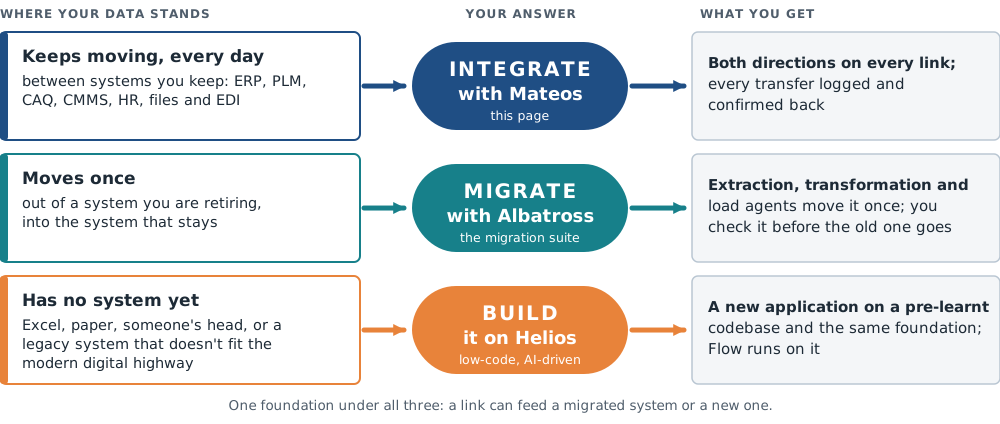
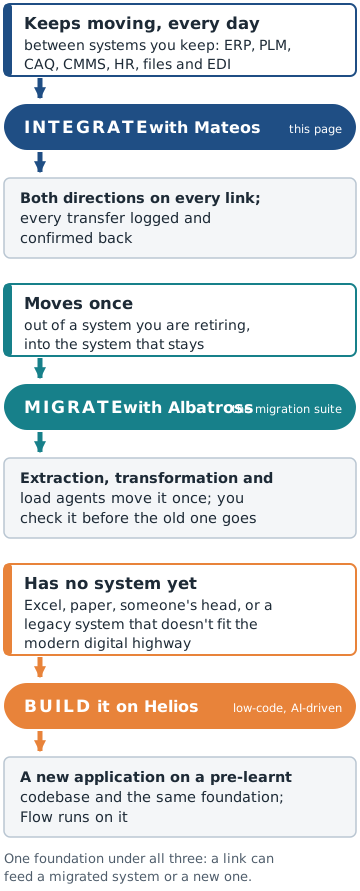
Three rows. Data that keeps moving every day between systems you keep: integrate with Mateos, both directions on every link, every transfer logged and confirmed back. Data that moves once, out of a system you are retiring into the system that stays: migrate with Albatross, extraction, transformation and load agents move it once and you check it before the old system goes. A process with no system yet, Excel, paper, someone's head, or a legacy system that doesn't fit the modern digital highway: build it on Helios, low-code and AI-driven, a new application on a pre-learnt codebase and the same foundation, with Flow running on it.Three rows. Data that keeps moving every day between systems you keep: integrate with Mateos, both directions on every link, every transfer logged and confirmed back. Data that moves once, out of a system you are retiring into the system that stays: migrate with Albatross, extraction, transformation and load agents move it once and you check it before the old system goes. A process with no system yet, Excel, paper, someone's head, or a legacy system that doesn't fit the modern digital highway: build it on Helios, low-code and AI-driven, a new application on a pre-learnt codebase and the same foundation, with Flow running on it.

The loop your systems feed

  1. Connect: LoomYour machines, old and new.
  2. See: Pragmatos LiveThe plant on one screen, as it runs.
  3. Analyze: PulseWhat changed, machine by machine.
  4. Decide: OrbisOrbis proposes, a person approves.
  5. Act: FlowThe decision becomes work.
  6. Prove: DecisionsEvery decision on the record.

What Mateos connects

Integrate · Mateos

Your ERP stays. Your PLM stays. The re-typing goes.

SystemWhat comes inWhat goes back
ERP

Orders, parts, documents and changes.

Confirmations, so both systems hold one truth.

PLM

Parts, BOMs and change orders from engineering, to the floor without re-typing.

Item status and confirmations.

CAQ

Findings and measures, where your CAQ has an interface.

Findings and measures from the floor, in step.

CMMS and maintenance

Work orders out to the floor, where your maintenance system has an interface.

Completions back.

HR and time

Shifts, qualifications and time records, where the floor needs them.

Time records to the system that owns them.

Finance

Costs and postings with their source.

Postings with their source.

Legacy databases

A table or a query from an older system, offered as an interface.

A query result, on request.

File drops and spreadsheets

The file drop and the spreadsheet that move data today, picked up on schedule.

A file in the format the next system reads.

EDI with your customers

Call-offs, in the formats your customers send.

Shipping notices, in the formats your customers read.

Both directions on every row: a change made in one system reaches the others, and every transfer confirms back.

Retiring an old system? If its data only has to move once, migrate it with Albatross. If the process it ran has no modern home, or the system doesn’t fit the modern digital highway, build it on Helios.

From engineering to the floor

Integrate · Mateos

Enterprise systems exchange data and processes in both directions: routed, transformed and mediated between two systems or several.

  1. Engineering releasesParts, documents, design files, BOMs, change orders, classification, item status, cost, compliance, supplier, procurement, customer and service information leave the system that holds them.
  2. Attributes mappedExtracted, mapped, transformed and synchronised between the systems that hold them: your field names, your units, your codes.
  3. The process continuesA workflow that starts in one enterprise system continues in the next, across systems that were never designed to talk.
  4. Confirms backEach transfer confirms back, so the sending system knows the receiving one holds the change.

One version of the truth. Design, release and change run together from engineering through production, warehousing and supply.

One master record for each item, or product information distributed across several systems. You choose the mode.

Which part of this page is yours

Integrate · Mateos

You have seen what Mateos connects and what moves between your systems. From here the page splits: if you run the interfaces, the next three sections are written for you. If you own the ERP or run the floor, your answers are one click away.

IT and integration

You run the interfaces. The technical sections are yours.

Standards you already know: REST with OpenAPI, Kafka, SFTP and file drops. Every transfer is logged with its result, so when something does not arrive, you read the log instead of guessing.

  1. How Mateos builds the linkAPI gateway, integration engine, event backbone
  2. What the Mateos integration layer doesroute, map, bridge, retry, and where agents help
  3. Mateos capabilitiesprotocols, EDI, data services, the record

Where it runs: on prem, your own cloud, or both, on your own VMs or Kubernetes, with one PostgreSQL database and your directory for sign-in. Deployment questions

ERP owner

Your ERP stays the system of record.

You decide which system owns which fact; Mateos enforces it and confirms every transfer back. Nothing moves in or out of your ERP that you have not agreed to, and the link uses the ERP’s documented interfaces.

Operations
Plant and operationsQualityMaintenance

You run the floor. The work should arrive without re-typing.

Orders reach the floor from the ERP and completions go back. Findings land in your CAQ, not in a spreadsheet next to it. Work orders go out from your maintenance system and completions come back. When a transfer fails, it raises a task in Flow instead of going quiet.

How Mateos builds the link

Integrate · Mateos

An API gateway, an integration engine and an event backbone. Standard where a standard exists; a connector where it doesn't.

The Fabric backbone: one woven layer, three strandsA weave. Vertical threads are your systems: ERP, PLM, MES, CAQ, CMMS, historian, files, EDI and Pragmatos. Three horizontal strands run through all of them as one layer: the API gateway, OAuth2, JWT or API keys, OpenAPI, publish, secure, rate-limit and version; the integration engine, route, transform, enrich, bridge one protocol to the next; the event backbone, Apache Kafka, each system hears about a change once. Every transfer is logged with its result.ERP PLM MES CAQ CMMS Historian Files EDI Pragmatos API gateway OAuth2, JWT or API keys · OpenAPI publish, secure, rate-limit, version Integration engine route, transform, enrich bridge one protocol to the next Event backbone Apache Kafka each system hears a change once Warp: your systems. Weft: three strands of one layer. Every transfer is logged with its result; a failed one raises a task.The Fabric backbone: one woven layer, three strandsStacked weave. Vertical threads: ERP, PLM, CAQ, CMMS, EDI, Pragmatos. Three strands across them: API gateway, integration engine, event backbone, each with what it does.ERP PLM CAQ CMMS EDI Pragmatos API gateway Integration engine Event backbone API gateway OAuth2, JWT or API keys · OpenAPI · publish, secure, rate-limit, version Integration engine route, transform, enrich · bridge one protocol to the next Event backbone Apache Kafka · each system hears a change once
One layer, three strands. A transfer crosses all three on its way from one of your systems to the next.

API gateway

Publish your interfaces once and secure them with OAuth2, JWT or API keys; rate-limit, version and retire them. Described in OpenAPI.

The strand your partners and your own teams call.

Integration engine

Route, transform, enrich, filter, split and aggregate messages, and bridge one protocol to the next.

The strand that does the mapping between your systems.

Event backbone

Apache Kafka carries events between systems, so each one hears about a change once.

The strand that tells every system what just changed.

Connects by standard: REST with OpenAPI, events over Kafka, file and data import.

What the Mateos integration layer does

Integrate · Mateos

The functions every link we build can use. Follow one message through the layer.

One message through the integration layerA message's journey in six stations. It arrives on a schedule, a file drop, an inbound endpoint or a Kafka event. It is routed by order type, plant, customer or part family; mapped, XML, JSON, CSV or EDI, field by field; bridged, REST on one side, SFTP or a queue on the other; orchestrated as one business step across several systems, in order; delivered and logged with its result, and the system confirms back. If a delivery fails it is retried; what still fails goes to a dead-letter queue where a person resolves it. 1 Arrives a schedule, a file drop, an endpoint or a Kafka event 2 Routed by order type, plant, customer or part family 3 Mapped XML, JSON, CSV, EDI; field by field, your codes 4 Bridged REST on one side, SFTP or a queue on the other 5 Orchestrated one business step, several systems, in order 6 Delivered, logged result on the record; the system confirms back msg Delivery failed? retried; what still fails goes to a dead-letter queue, a person resolves it Published interfaces, managed the interfaces you offer are published, secured, rate-limited and versioned; an API catalogue for suppliers, customers, teamsOne message through the integration layerVertical timeline of six stations: arrives, routed, mapped, bridged, orchestrated, delivered and logged. A failed delivery is retried; what still fails goes to a dead-letter queue where a person resolves it. Interfaces you offer are published, secured, rate-limited and versioned. 1 Arrives a schedule, a file drop, an endpoint or a Kafka event 2 Routed by order type, plant, customer or part family 3 Mapped XML, JSON, CSV, EDI; field by field, your codes 4 Bridged REST on one side, SFTP or a queue on the other 5 Orchestrated one business step, several systems, in order 6 Delivered, logged result on the record; the system confirms back Delivery failed? retried; what still fails goes to a dead-letter queue, where a person resolves it Published interfaces, managed published, secured, rate-limited, versioned; an API catalogue for suppliers, customers, teams
One message, six stations. It arrives, is routed, mapped and bridged, runs in order with the others, and lands with its result on the record.
  1. Scheduled and event-triggeredTransfers run on a schedule or when an event arrives.
  2. Content-based routingEach message goes where its content says: by order type, plant, customer or part family.
  3. Transformation and mappingXML, JSON, CSV and EDI, converted and mapped field by field between systems.
  4. Protocol bridgingOne system speaks REST, the next SFTP or a message queue. The layer bridges them.
  5. OrchestrationOne business step that touches several systems runs as one sequence, in order.
  6. Retry and dead lettersFailed deliveries are retried. A message that still fails goes to a dead-letter queue, where a person resolves it.
  7. API managementPublish, secure, rate-limit and version the interfaces you offer.

Where agents help the Mateos layer

Agents do the reading and the first draft: the field lists, the sample messages, the failed deliveries. You keep the decision.
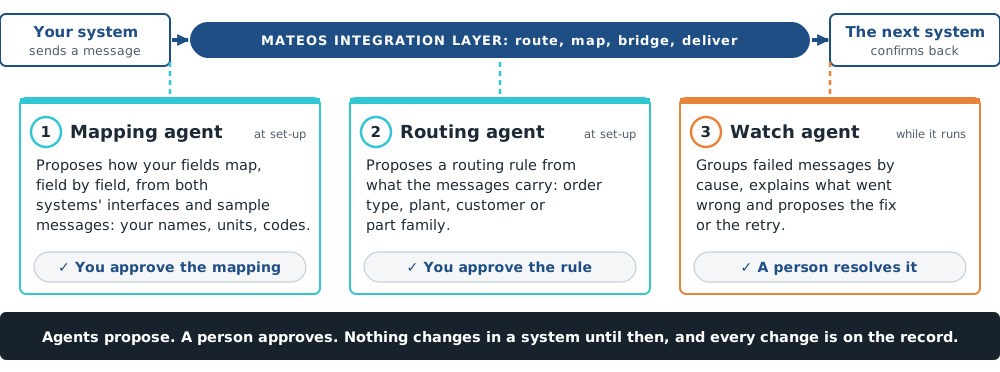
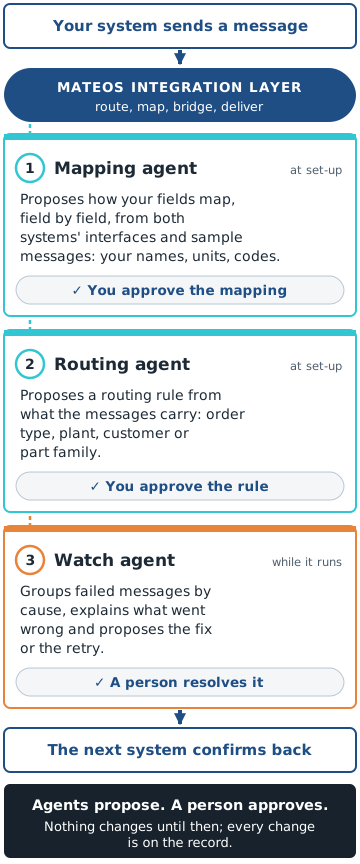
A message runs from one of your systems through the Mateos integration layer to the next. Three agents work beside it. Mapping agent: proposes how your fields map, field by field, from both systems' interfaces and sample messages; you approve the mapping. Routing agent: proposes a routing rule from what the messages carry, such as order type, plant, customer or part family; you approve the rule. Watch agent: groups failed messages by cause, explains what went wrong and proposes the fix or the retry; a person resolves it. Agents propose, a person approves; nothing changes in a system until then, and every change is on the record.A message runs from one of your systems through the Mateos integration layer to the next. Three agents work beside it. Mapping agent: proposes how your fields map, field by field, from both systems' interfaces and sample messages; you approve the mapping. Routing agent: proposes a routing rule from what the messages carry, such as order type, plant, customer or part family; you approve the rule. Watch agent: groups failed messages by cause, explains what went wrong and proposes the fix or the retry; a person resolves it. Agents propose, a person approves; nothing changes in a system until then, and every change is on the record.
Agents propose; a person approves. Nothing changes in a system until then.

Mateos capabilities

Integrate · Mateos

What a link can speak, read and prove.

ProtocolsHTTP/REST, SOAP, JMS, AMQP, MQTT, FTP/SFTP and file drop, e-mail, WebSocket, Kafka.
EDIEDI with your customers: EDIFACT and VDA call-offs and shipping notices.
Your field names, your units, your codesWe map; you don't re-key. One master or several: you decide which system owns which fact, and the link enforces it.
Data servicesA table or a query in a legacy database, offered as a REST interface.
Scheduled and event-triggeredPolling on a schedule, a file drop, an inbound endpoint or a Kafka event starts the transfer.
API catalogueFor your suppliers, customers and your own teams. One place to find each interface and its description.

Every transfer on the record

Every transfer is logged with its result; a failed one raises a task, not silence. Every transfer confirms back.

Observability

OpenTelemetry traces and metrics, dashboards for every link.

Tasks

Tasks run in Flow; the record lands in the system that owns it.

How we built our own

Integrate · Mateos

Our own ERP and MES links are built on this foundation.

Pragmatos Fabric, the link layer inside our Platform, is built with the same building blocks we offer you: Java and Spring Boot, REST and webhook interfaces described in OpenAPI, Apache Kafka for events. The connectors we ship for SAP Business One, Microsoft Dynamics and Odoo are our own code on that foundation. When you integrate with Mateos, we build your link the way we built ours.

Where does your data stop moving?

Integrate · Mateos

Before we build a link, we walk one process with you end to end and mark where the data stops moving: where data gets re-typed, where a file is e-mailed between systems, where a hand-off waits for a person.

The gap walk in four stepsFlow diagram in four steps. You bring one process and the person who runs it. We walk it on the floor, end to end, we or your integration partner. We mark where it stops: data re-typed, a file e-mailed between systems, a hand-off waiting for a person. You keep the map, whatever you do with it; if the fix is a setting in a system you own, we say so.You bringOne processThe person who runs itWe walk itOn the floor, end toendWe, or yourintegration partnerWe mark where itstopsData re-typedA file e-mailedbetween systemsA hand-off waiting fora personYou keep the mapWhatever you do withitIf the fix is asetting in a systemyou own, we say soThe gap walk in four stepsFlow diagram in four steps. You bring one process and the person who runs it. We walk it on the floor, end to end, we or your integration partner. We mark where it stops: data re-typed, a file e-mailed between systems, a hand-off waiting for a person. You keep the map, whatever you do with it; if the fix is a setting in a system you own, we say so.You bringOne processThe person who runs itWe walk itOn the floor, end to endWe, or your integration partnerWe mark where it stopsData re-typedA file e-mailed between systemsA hand-off waiting for a personYou keep the mapWhatever you do with itIf the fix is a setting in a systemyou own, we say so

The map is yours

The map is yours, whatever you do with it. If the fix is a setting in a system you already own, we say so.

Who walks it

We, or your integration partner.

You bring one process and the person who runs it; we walk it on the floor and leave you the map.

Each gap on the map has one of three answers.

Name the two systems that don't talk. We'll show you the link.

You bring one process and the person who runs it; we walk it on the floor and leave you the map.

Name the two systems

Where to go next

Get new articles by email

One shop-floor problem at a time.

Your questions about integrating with Mateos

Technically, no: we use the ERP's documented interfaces and change nothing inside it. Whether your ERP contract covers use through a connected system (SAP calls it indirect or digital access) is a licence question; we list the documents the link reads and creates so you can settle it with your ERP partner before go-live.
The mapping is documented and tested against the interface version; after an upgrade we re-test it with you, from the documentation you already hold.
Yes: on prem, your own cloud, or both. It runs on your own VMs or Kubernetes, with one PostgreSQL database and your directory for sign-in.
No. The link layer stands on its own; with Pragmatos, it also feeds the loop.
No. An agent in Mateos proposes a mapping, a routing rule or a fix for a failed message; a person approves it before anything changes, and every change is on the record.
Then it is a migration, not a link: migrate it with Albatross. Extraction, transformation and load agents move the data out of the system you retire and into the one that stays, and you check it before the old system goes. How a migration is planned.